Fit Shapes Review: The Adaptive Calorie Tracker I Built
I built Fit Shapes, so read this as a founder's notes and not as a neutral review. It's a calorie and macro tracker for iPhone, made for people who lift and are cutting, bulking or maintaining on purpose. I wanted logging a meal to take seconds, and I wanted my targets to follow what my body actually did.
In January I weighed close to 220 pounds, the most since I played high school football. My blood pressure ran high, I had headaches most weeks, and I felt terrible. So I started counting calories again. I tried the usual trackers and hated opening them. The free ones pushed ads at me, and the paid ones took a dozen taps per meal.
So I built my own, and I've used it every day for months. This morning I weighed 195. Nothing fancy got me there. I ate less than I burned and kept at it. Fit Shapes made it easier to keep at it. I wrote more about that on my personal site.
Why trust me?
You shouldn't take my word as independent. I designed and built Fit Shapes, I own it, and I make money when you subscribe. Nobody paid me to write this, but I have every reason to like it.
What I can offer is detail. I've designed software for more than 15 years, and I've logged my own food in Fit Shapes three to five times a day for months. That's 25 pounds of using it on myself. Below I cover what I think it does well and where it still falls short.
What I like about Fit Shapes
Logging a meal takes seconds
Speed is the reason Fit Shapes exists. Point the camera at your plate and tap the shutter, and the camera closes. The meal lands in your log with its calories and macros a few seconds later. That's two taps, with nothing to confirm. If something looks off, you tap the row and fix it.
The same camera reads a barcode or a nutrition label and uses the numbers on the package. For a meal you can't photograph, type or say what you ate. I say something like "two eggs scrambled in butter and a slice of sourdough" and it's logged. Your phone turns speech into text, so no audio leaves it.
Targets that follow your weight
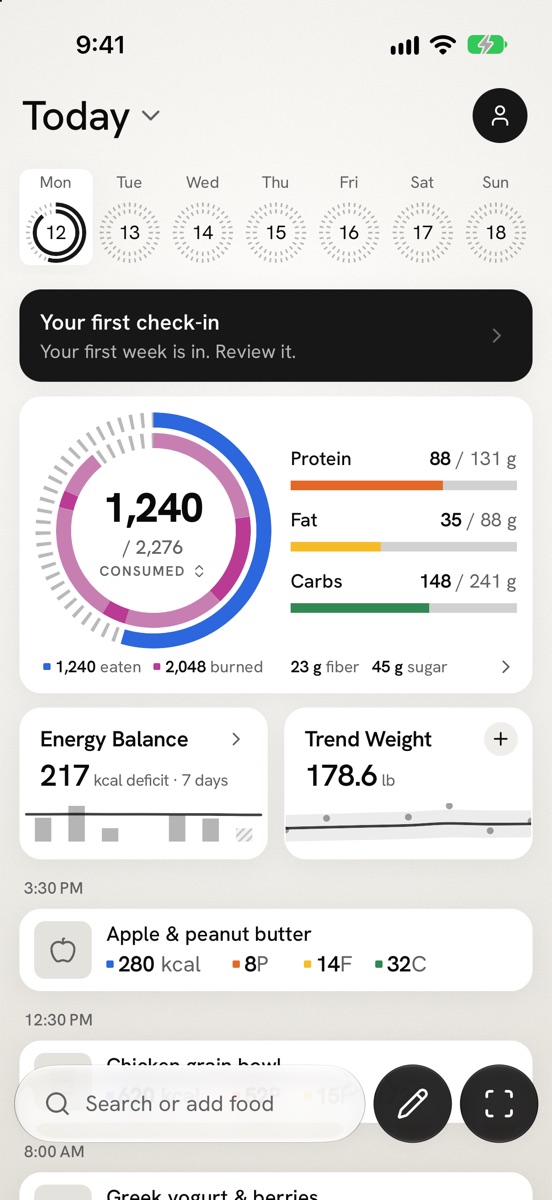
Most trackers set your calorie target from a formula once and never revisit it. Fit Shapes starts from a formula too, then stops guessing. It compares what you log with how your trend weight moves, and works out what you really burn. If you eat about 2,300 calories a day and your weight holds steady, you burn about 2,300. Today puts what you've eaten next to what you've burned, with your active energy from Apple Health.
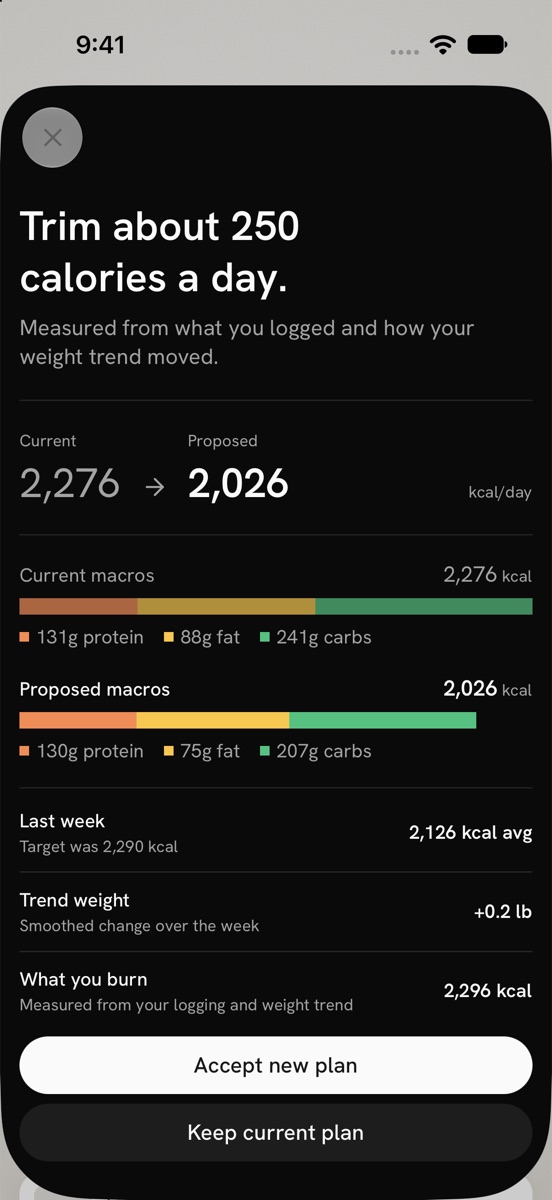
Each week it puts the change in one line, like "Trim about 250 calories a day," and shows the new macros next to your current ones. It also forecasts when you'll reach your goal, as a window of weeks rather than a single date. One heavy weigh-in doesn't throw that forecast off.
Vitamins and minerals too
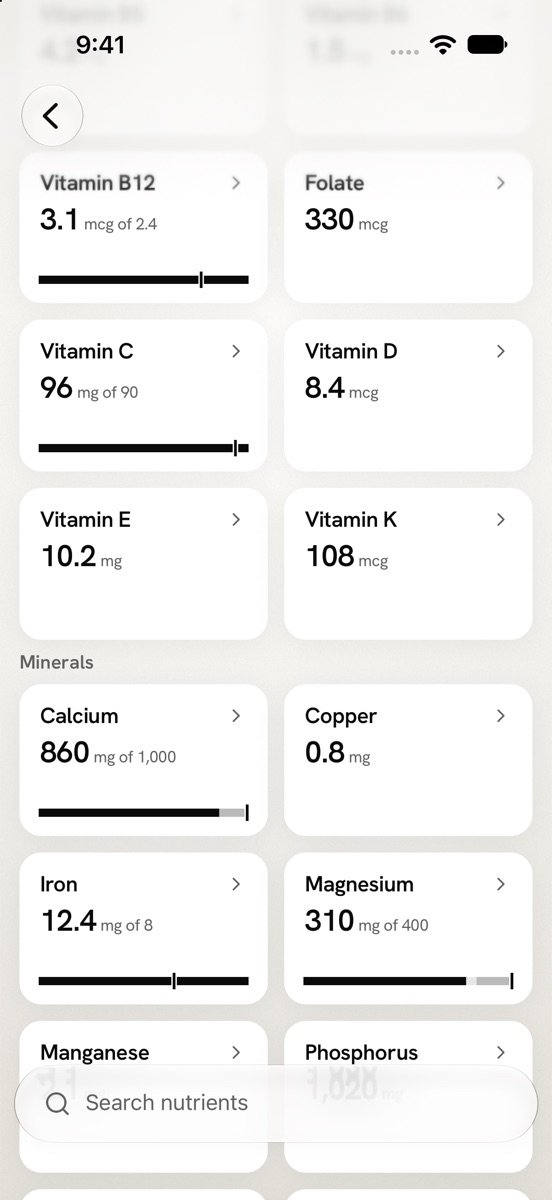
Tap the calorie card and you get fiber, sugar, vitamins and minerals for the day or the last seven days. Each one has a goal set from the dietary reference intakes for your age and sex. When a food in the day has no value for a nutrient, Fit Shapes shows the total with a "≥" sign. It doesn't pretend the number is complete.
Your data comes and goes with you
Fit Shapes imports your history from MacroFactor, Cronometer, Lose It!, Cal AI and MyFitnessPal. Your old weigh-ins let it estimate what you burn from day one. It reads weight, body fat and active energy from Apple Health, or from Health Connect on Android. You can export everything as a CSV at any time, even after your subscription ends.
Agent integrations
Along with your data belonging to you, with your permission, you can give agents access to your data. Ask Claude or Gemini (and soon ChatGPT) to log a meal, figure out what to eat for dinner—even what to order on DoorDash or Uber Eats!
If you're a data nerd, take your macros, vitamins and minerals and have agents build you an interactive health dashboard.
What needs improvement
There's no free plan
You get a 14-day free trial, then it's $4.99 a month or $29.99 a year. Cronometer and Lose It! both have free plans. If you only want to count calories, one of those may be all you need.
Android is still in beta
Fit Shapes is on the App Store for iPhone. The Android app is a closed beta, and it doesn't do everything the iPhone app does yet.
It's a new app
MacroFactor, Cronometer and MyFitnessPal have years of updates behind them. Fit Shapes launched on the App Store in October 2026. It doesn't have that track record yet, and you'd be an early user.
Photo estimates are estimates
A photo can't tell how much oil went into the pan. Fit Shapes estimates each food and its portion, and those numbers can miss. For anything with a label, scan the label instead.
Final thoughts
If you train, track every day and want logging to get out of your way, Fit Shapes is the tracker I built for that. Try it free for 14 days on the App Store, or read more at fitshapes.com.